GitHub Strike

Beautiful developer stats cards for your GitHub README

Preview

GitHub Strike Card

Deploy your own instance to get personalized stats with your GitHub token.

Quick Start

1

Get Your GitHub Token

Create a personal access token at GitHub Settings.

Required scopes: read:user, repo (for private repo stats)

2

Deploy Your Instance

Choose your preferred deployment method below.

3

Add to Your README

Use your deployed URL to embed the stats card in your GitHub profile.

Deployment

Test Locally

Clone and run the project on your machine:

git clone https://github.com/cancelei/github_strike.git cd github_strike npm install

Create a .env file:

GITHUB_TOKEN=ghp_your_token_here FLUKEBASE_API_KEY=fbk_your_key_here # Optional

Start the server:

npm run dev

Open http://localhost:3000/api/strike/YOUR_USERNAME

Deploy with Docker

Build and run with Docker:

git clone https://github.com/cancelei/github_strike.git cd github_strike docker build -t github-strike .

Run the container:

docker run -d -p 3000:3000 \ -e GITHUB_TOKEN=ghp_your_token_here \ -e FLUKEBASE_API_KEY=fbk_your_key_here \ github-strike
For production, deploy to any Docker host (AWS ECS, Google Cloud Run, DigitalOcean, Railway, etc.) and set the environment variables in your platform's dashboard.

Deploy to Vercel

1. Fork the repository on GitHub:

https://github.com/cancelei/github_strike

2. Import to Vercel:

  • Go to vercel.com/new
  • Import your forked repository
  • Framework Preset: Other
  • Build Command: npm run build
  • Output Directory: dist

3. Add Environment Variables in Vercel dashboard:

Name Value
GITHUB_TOKEN Your GitHub personal access token
FLUKEBASE_API_KEY Your Flukebase API key (optional)

4. Deploy and get your URL (e.g., github-strike-yourusername.vercel.app)

Note: You may need to create a vercel.json for proper routing. See the repo README for details.

Deploy to CapRover

1. Create a new app in your CapRover dashboard

2. Set environment variables in App Configs:

Name Value
GITHUB_TOKEN Your GitHub personal access token
FLUKEBASE_API_KEY Your Flukebase API key (optional)

3. Deploy via CLI:

git clone https://github.com/cancelei/github_strike.git cd github_strike caprover deploy

Or deploy from GitHub in the CapRover dashboard using the repo URL.

Environment Variables

Variable Required Description
GITHUB_TOKEN Required GitHub Personal Access Token for fetching your stats
FLUKEBASE_API_KEY Optional Flukebase API key for project collaboration stats
PORT Optional Server port (default: 3000)

Add to Your README

Once deployed, add this to your GitHub profile README:

Enter the URL where you deployed GitHub Strike
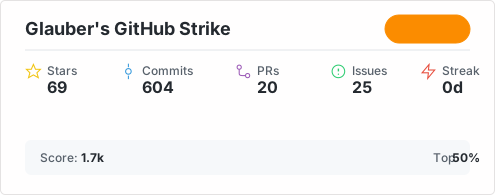
![GitHub Strike](https://github-strike.flukebase.me/api/strike/cancelei)
GitHub Strike Card

Available Endpoints

Endpoint Description
/api/strike/:username Main stats card with Strike rank
/api/languages/:username Top programming languages breakdown
/api/achievements/:username Achievement bolts and badges
/api/streak/:username Contribution streak stats
/api/timeline/:username Contribution timeline graph
/api/flukebase/:username Flukebase project stats (requires API key)
/api/health Health check endpoint

Query Parameters

All endpoints support these optional parameters:

Parameter Values Description
theme electric, midnight, aurora, ember, frost, neon, sunset, ocean, forest, cyber Card color theme